COMING JULY 2026 · In final review — Mac App Store

Every file testifies.
Control what it says.

MetaWrite is the forensic-grade metadata suite for macOS. Inspect every hidden tag, rewrite timestamps, GPS, and device signatures, or erase them completely — with cryptographic proof, and without a single byte leaving your Mac.

Native macOS · Apple Silicon & Intel · Free download, Pro unlock in-app

GPS43°16'25.5"N — exposed
EDITDateTimeOriginal → rewritten
SHA-256verified ✓
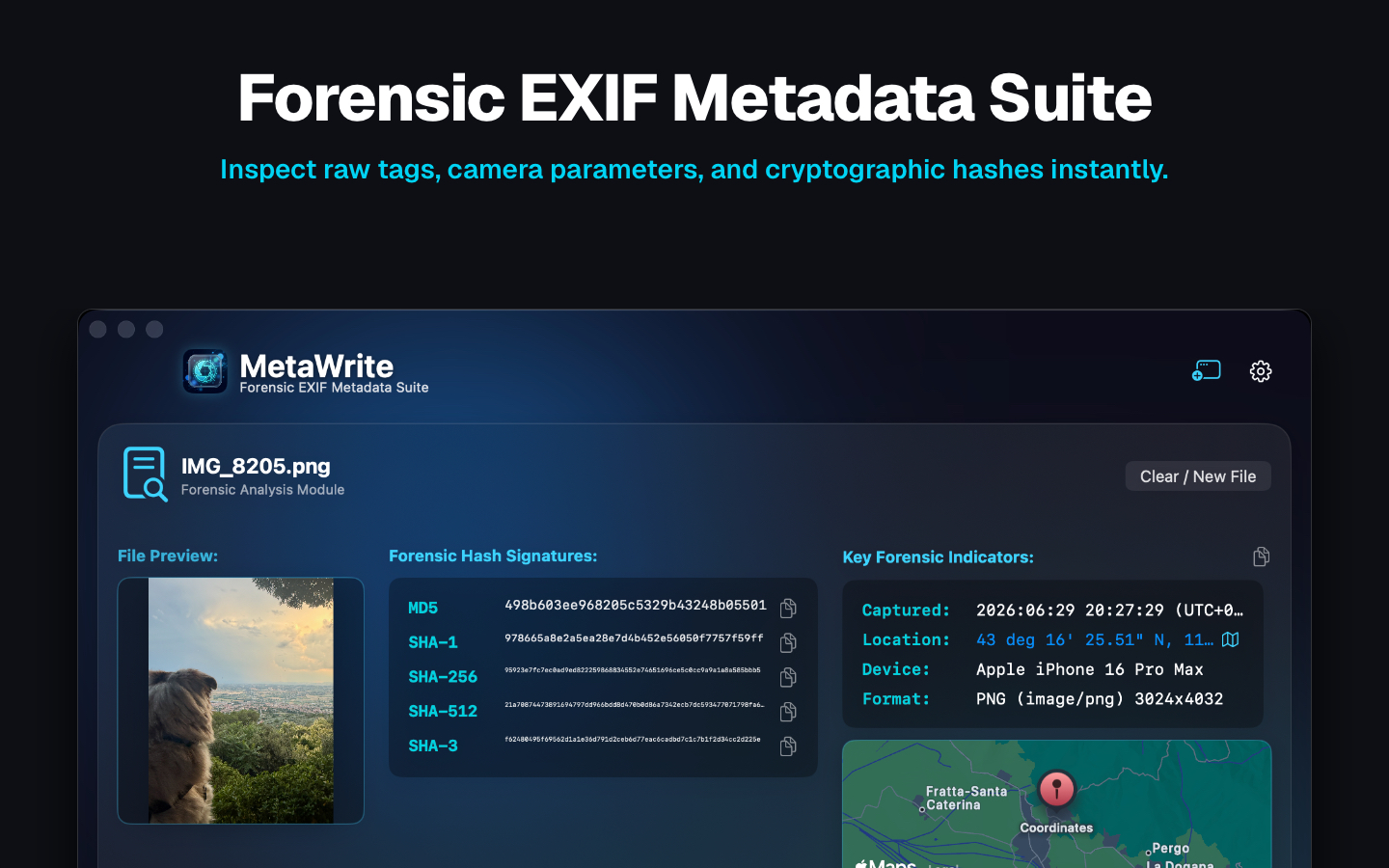
MetaWrite forensic analysis window on macOS showing hash signatures, key forensic indicators, and a location map
Forensic investigators Cybersecurity analysts Investigative journalists Legal teams Law enforcement operations Privacy professionals
The Suite

One workbench.
Total metadata authority.

Images, videos, PDFs, and Office documents carry hundreds of invisible tags. MetaWrite gives you full read–write–wipe control over all of them.

Inspect

Deep Forensic Tag Inspection

Dissect the full internal metadata architecture — EXIF, IPTC, XMP, GPS, and manufacturer maker notes — in an interactive, searchable raw-tag viewer.

Rewrite

Granular Tag Editing

Don't just delete — change. Rewrite capture dates, GPS coordinates, camera serials, and creator tools field-by-field. Save tag-sets as reusable templates.

Scale

Batch Processing Powerhouse

Sanitize thousands of files simultaneously in the background, with automatic filename-collision safeguards protecting every original.

Prove

Chain-of-Custody Cryptography

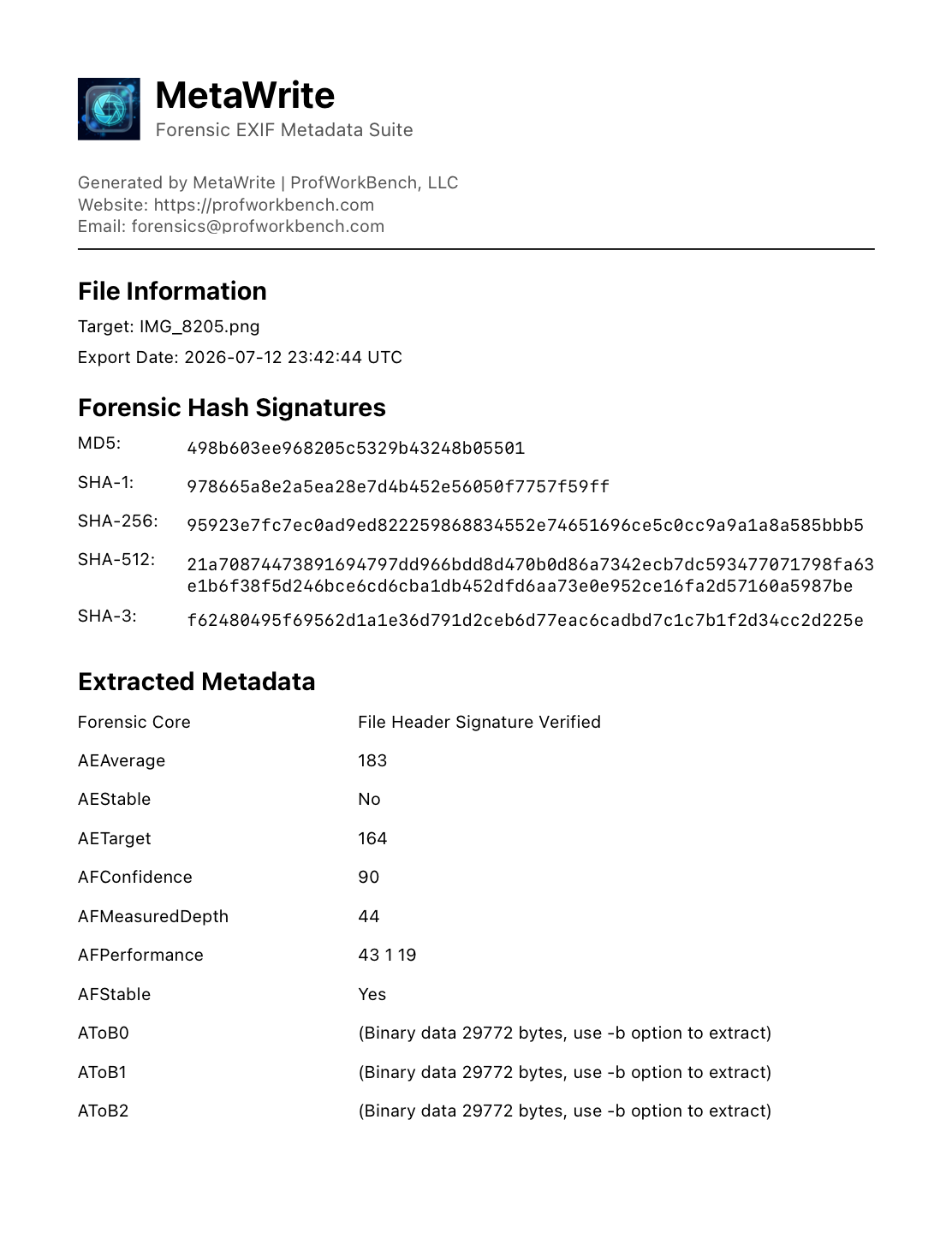
Compute MD5, SHA-1, SHA-256, and SHA-512 signatures and export courtroom-ready PDF certificates documenting origins, timestamps, and hashes.

Integrate

Native macOS Extensions

Strip metadata on-the-fly inside other apps with the native Share Extension and Photos Editor Extension. No exporting, no round-trips.

Contain

Map Air-Gap Mode

Geotags plot on native Apple MapKit. Enable Absolute Zero Telemetry and the app cuts all network access — the live map is replaced with a local air-gapped view, so coordinates and your IP never reach external mapping servers.

The Killer Feature

Other tools delete metadata.
MetaWrite rewrites it.

A stripped file raises questions. A controlled file answers them. MetaWrite is a true metadata editor — every tag is a field you own.

  • Rewrite any tag, field-by-field. Capture dates, GPS coordinates, device signatures, creator tools — double-click and type.
  • Synchronize file timestamps. Align filesystem dates with EXIF capture times — or set them to exactly what your workflow requires.
  • Save tag-sets as templates. Build your standard redaction or attribution profile once, apply it to every case file after.
  • Originals stay untouched. Edits export as verified copies with collision-safe filenames and full hash logs.
MetaWrite — Edit Mode · IMG_8205.png
DateTimeOriginal2026:06:29 20:27:292026:01:15 09:00:00
GPSLatitude43°16'25.51"N— removed —
GPSLongitude11°44'12.13"E— removed —
DeviceApple iPhone 16 Pro Max— removed —
BodySerialNumberF2LW48XKQ1J9— removed —
CreatorToolPhotos 26.5CaseFile Workflow v2
Exported as IMG_8205_1.png · SHA-256 logged · original preserved
Interactive Demo

The Evidence Lab

See what your files are saying behind your back. Open a case sample — or drop one of your own photos. Analysis runs entirely in your browser: nothing is uploaded, ever. Just like the app.

MetaWrite Evidence Lab — browser preview LOCAL-ONLY · NO UPLOAD

Analyze your own file

Drop a photo or click to browse

⏻ 100% local — parsed in your browser, never uploaded

Case samples

EXPOSURE
Double-click any tag to edit — in the full app
Zero-Knowledge Architecture

Built for rooms where
the Wi-Fi is turned off.

MetaWrite runs entirely on your Mac. No accounts. No third-party tracking. No crash reporting. No external APIs. It works identically in a newsroom, a lab, or a SCIF.

0
bytes sent off-device
0
trackers & analytics SDKs
100%
air-gap compatible
4+
hash algorithms, computed locally
MetaWrite forensic PDF certificate showing file information and hash signatures
HASH-VERIFIED DOCUMENT
Chain of Custody

Evidence that survives cross-examination.

Every operation can be sealed with a forensic PDF certificate: source file, export timestamps, and the complete set of cryptographic hash signatures — MD5, SHA-1, SHA-256, SHA-512.

  • Courtroom-ready formatting — clean, printable, and unambiguous.
  • Before/after documentation of exactly which tags changed and when.
  • Batch logs covering entire directories in a single audit trail.
Pricing

Start free. Go Pro when it matters.

Free download from the Mac App Store. Unlock the full forensic toolkit in-app.

Free
$0

Install it, explore it, learn the craft.

  • Dashboard & file intake — drop zone and file browsing
  • Complete User Guide — EXIF, hashes & forensics
  • All settings — incl. Absolute Zero Telemetry
  • Metadata analysis & hashes
  • Tag editing, wiping & batch jobs
  • Traceless exports & certificates
Coming July 2026
MOST POPULAR
Annual Pro
$29.99/year

The full forensic toolkit, always current.

  • Deep tag inspection — EXIF, IPTC, XMP & GPS
  • Rewrite any tag — dates, GPS, devices, serials
  • Cryptographic hashes & geolocation map
  • Traceless exports & timestamp sync
  • Batch processing at scale
  • Forensic PDF certificates & templates
  • Share & Photos extensions
Coming July 2026
Lifetime Pro
$99.99 once

Pay once. Own it forever. No subscription.

  • Everything in Annual Pro — forever
  • One-time purchase — no renewals
  • All future Pro features included
  • Ideal for agencies & procurement
  • Pays for itself vs. four years of Annual
Coming July 2026
FAQ

Questions from the field

When exactly does MetaWrite launch?
July 2026. The app is complete and in final review with the Mac App Store. Want a ping the moment it's live? Contact us and we'll notify you personally.
Does MetaWrite ever send my files anywhere?
No. MetaWrite runs 100% locally with zero telemetry — no accounts, no analytics, no crash reporting, no external APIs. For strict air-gapped environments, enable Absolute Zero Telemetry: the app cuts all network access entirely, deactivating even the Apple MapKit view in favor of a local air-gapped placeholder — so file coordinates and your IP address never reach external mapping servers.
Can it change metadata, or only delete it?
Both — and editing is the point. MetaWrite Pro lets you rewrite individual tags (capture dates, GPS coordinates, device identifiers, creator tools), synchronize filesystem timestamps with EXIF data, and save tag-sets as templates for repeatable workflows. Wiping everything is just one button among many.
What file types are supported?
Images (JPEG, PNG, TIFF, HEIC, and RAW formats), videos, PDFs, and Office documents. The inspector shows EXIF, IPTC, XMP, GPS, and manufacturer maker-note blocks.
Are edits destructive to my originals?
No. Edited and sanitized files export as copies with automatic collision-safe filenames (_1, _2…). Your originals — and their hash records — remain intact for your case file.
Will certificates hold up as documentation?
Certificates are formatted for professional use: source file details, export timestamps, and MD5 / SHA-1 / SHA-256 / SHA-512 signatures in a clean, printable PDF. Many teams attach them directly to case files and evidence logs. (As with any tool, admissibility rules vary by jurisdiction — consult your counsel.)
Mac only?
Yes — MetaWrite is a native macOS app, built for both Apple Silicon and Intel, distributed exclusively through the Mac App Store. Native means fast: batch jobs run in the background using Apple's frameworks.
MetaWrite app icon

Your files are talking.
Decide what they say.

MetaWrite lands on the Mac App Store in July 2026. Be first in line.

Free download · Pro from $29.99/yr or $99.99 lifetime